
PBFUnity - Position Based Fluids Framework in Unity
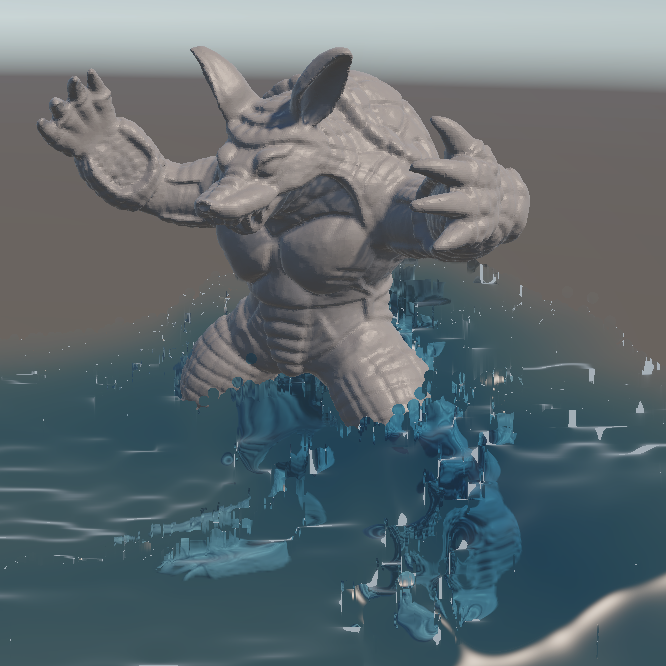
Fluid simulation is expensive, and game engines run at a fixed timestep that is too
large for classical Smoothed Particle Hydrodynamics to stay stable. Position Based
Fluids avoids this by correcting particle positions against a density constraint instead
of integrating pressure forces.
This thesis presents PBFUnity, an implementation of Position Based Fluids in Unity
6 that runs entirely on the graphics card. It consists of a solver of nine compute
kernels, a screen space renderer that reconstructs a fluid surface from particle depth,
two level of detail systems and a benchmark harness. No particle data is sent back
to the processor while a scene is running.
I measured the framework on six machines with graphics cards from an RTX 3060 up
to an RTX 4090, across ten scenes ranging from an empty tank to 127,526 particles,
each run with the level of detail switched on and off. From the RTX 3080 upward it
holds 60 frames per second in nine of the ten scenes, and on the RTX 4090 in all
ten. The level of detail improves the result only where frame times already lie close
to the target.
Description
Caution when using this program! Please make sure that your system is able to run this program, otherwise your system could crash or overheat. Additionally, the program requires Windows and a graphics card with Direct3D 12 support.
For that, you could take a peek into the tables below and check if your system is between the tested systems.
The Unity program consists of two modes to choose from: benchmark and testing area.
Both are accessible via the program by either pressing the return key to start the benchmark or pressing the tab key to enter the testing area.
While the benchmark is running, it is advised to do exactly nothing so that the results aren't influenced by it.
In the testing area, however, you can toy around with spawning water particles at different positions and test your systems limits that way.
The controls of the testing area are shown on screen, so that there shouldn't be any complications.
The benchmark results are saved as CSV files in a Benchmarks folder next to the program: one file per scene and a summary of the whole run.
| # | Scene | Particles | Water | Solid objects | Duration |
|---|---|---|---|---|---|
| 1 | EmptyAquarium | 0 | none | none | 5 s |
| 2 | RainyDay | 40,000 | 12,000 → 40,000 (2.8 s) | 16 boxes | 15 s |
| 3 | SimpleSlide | 40,000 | 20,000 → 40,000 (0.5 s) | 2 boxes | 12 s |
| 4 | Tsunami | 50,000 | all from the start | 10 boxes | 8 s |
| 5 | Meteoroids | 55,188 | all from the start | 6 boxes | 8 s |
| 6 | ScalingAquarium | 55,188 | all from the start | none | 15 s |
| 7 | FlowingDam | 70,000 | 7,000 → 70,000 (21.5 s) | 11 boxes | 50 s |
| 8 | BunnyInTheMiddle | 85,189 | 5,000 → 80,000 (19 s) | Bunny mesh, 5,189 boundary particles | 30 s |
| 9 | BunnyDrop | 79,032 | 34,575 → 79,032 (16.5 s) | none | 30 s |
| 10 | ArmadilloSplash | 127,526 | 60,000 → 120,000 (1.5 s) | Armadillo mesh, 7,526 boundary particles | 22 s |
Results
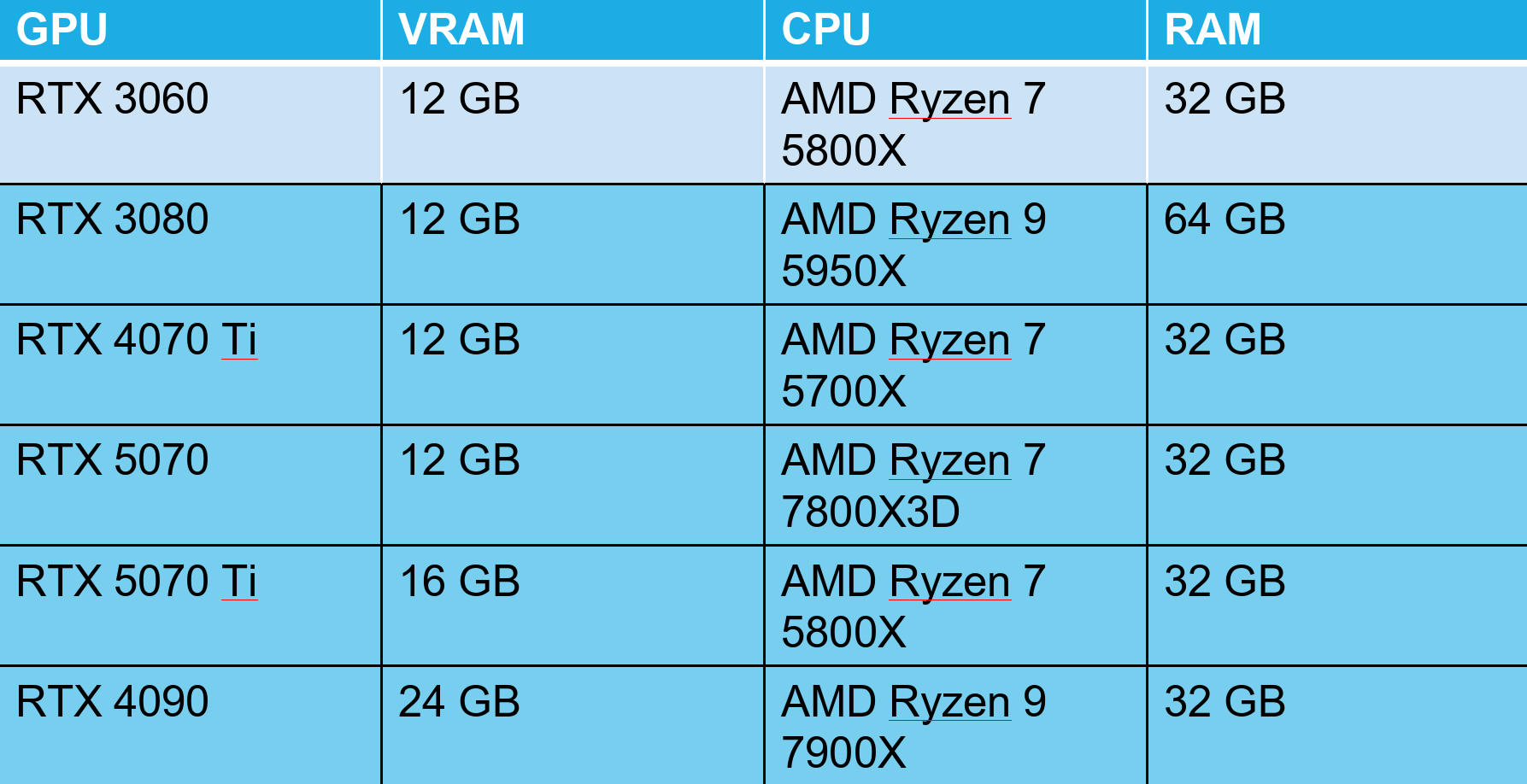
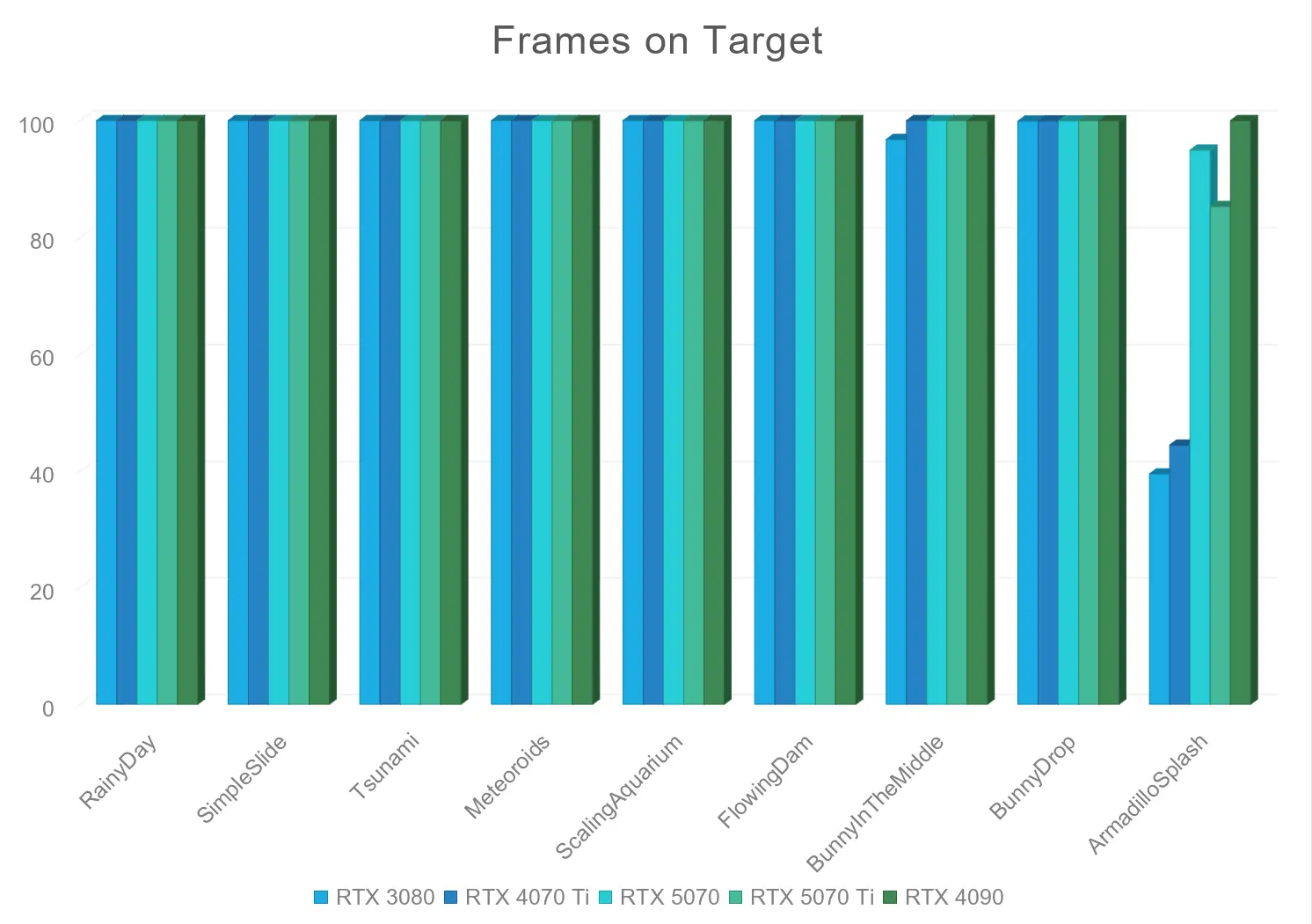
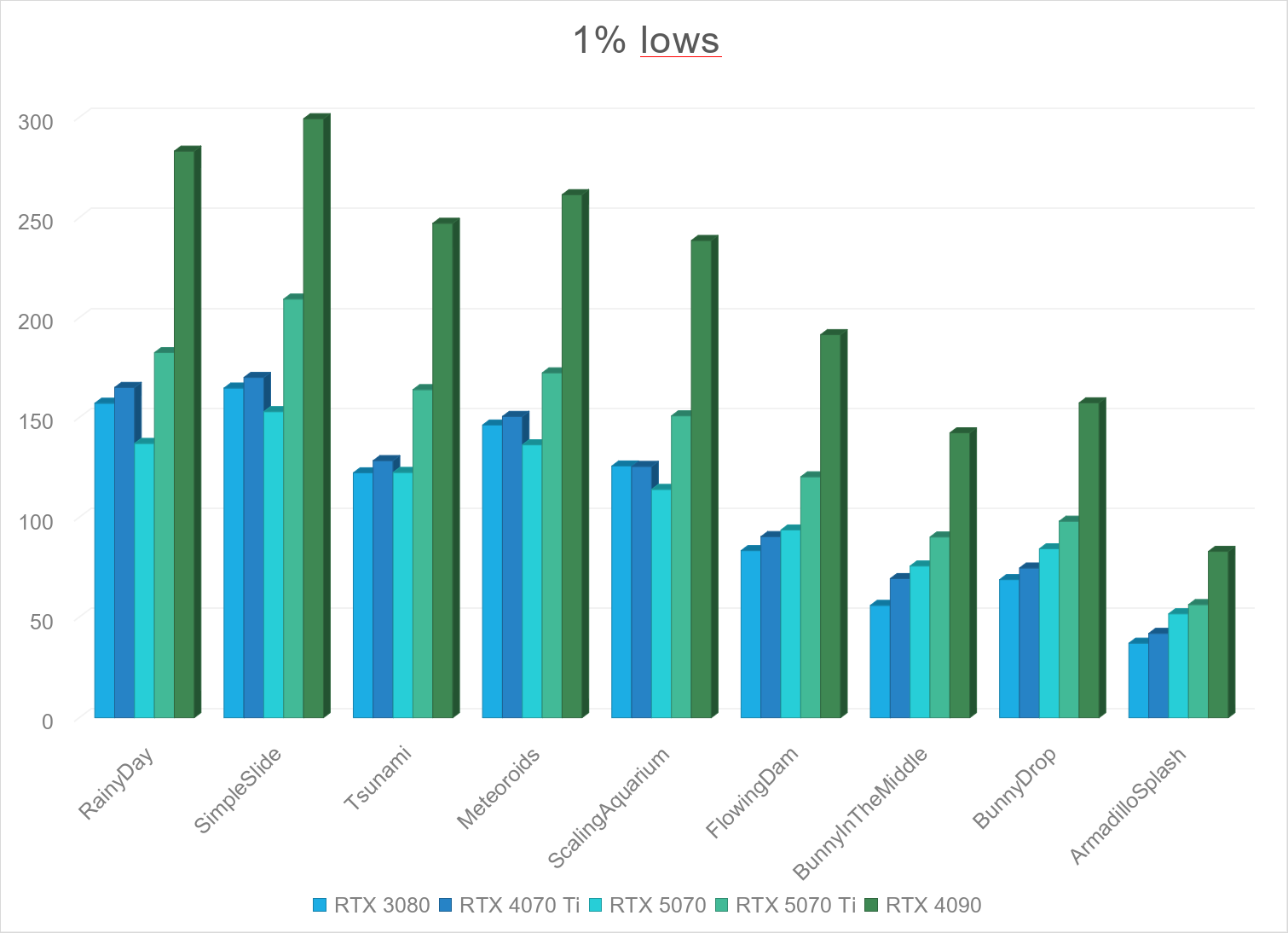
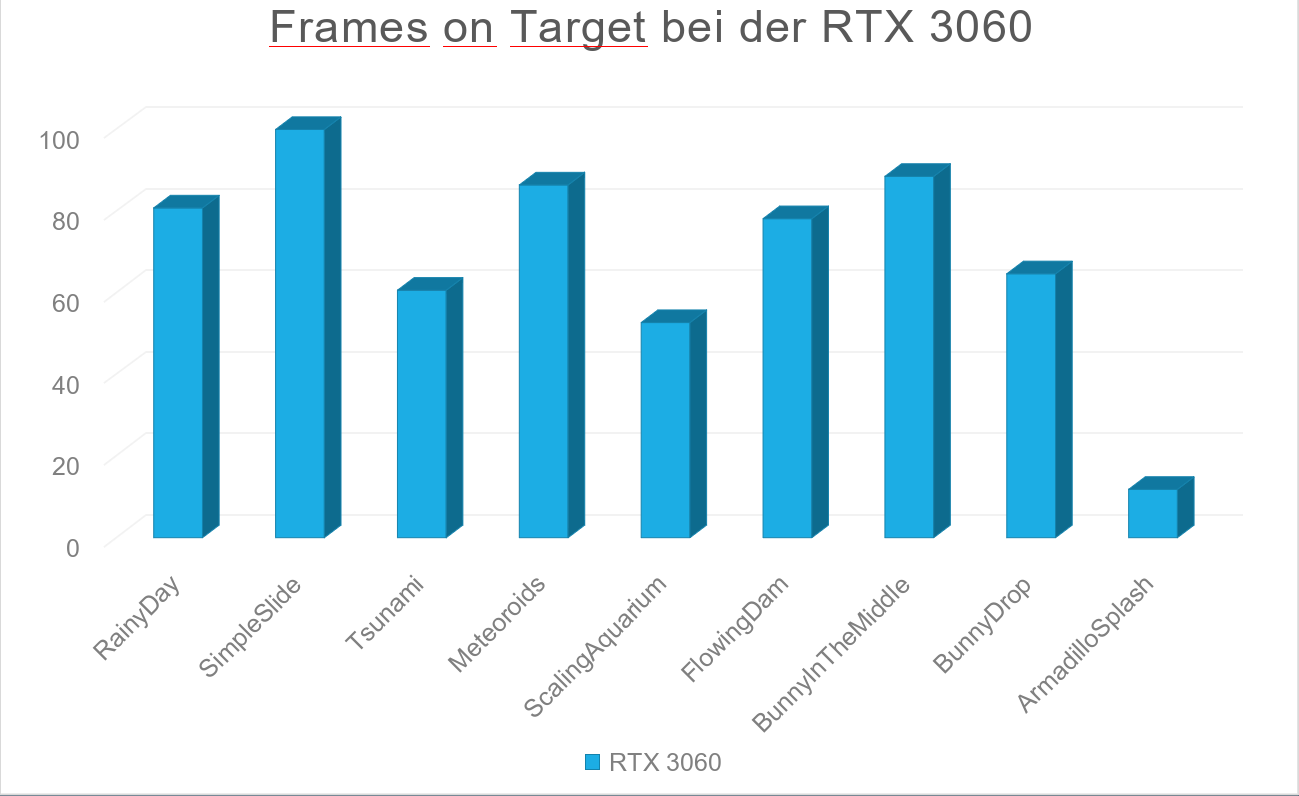
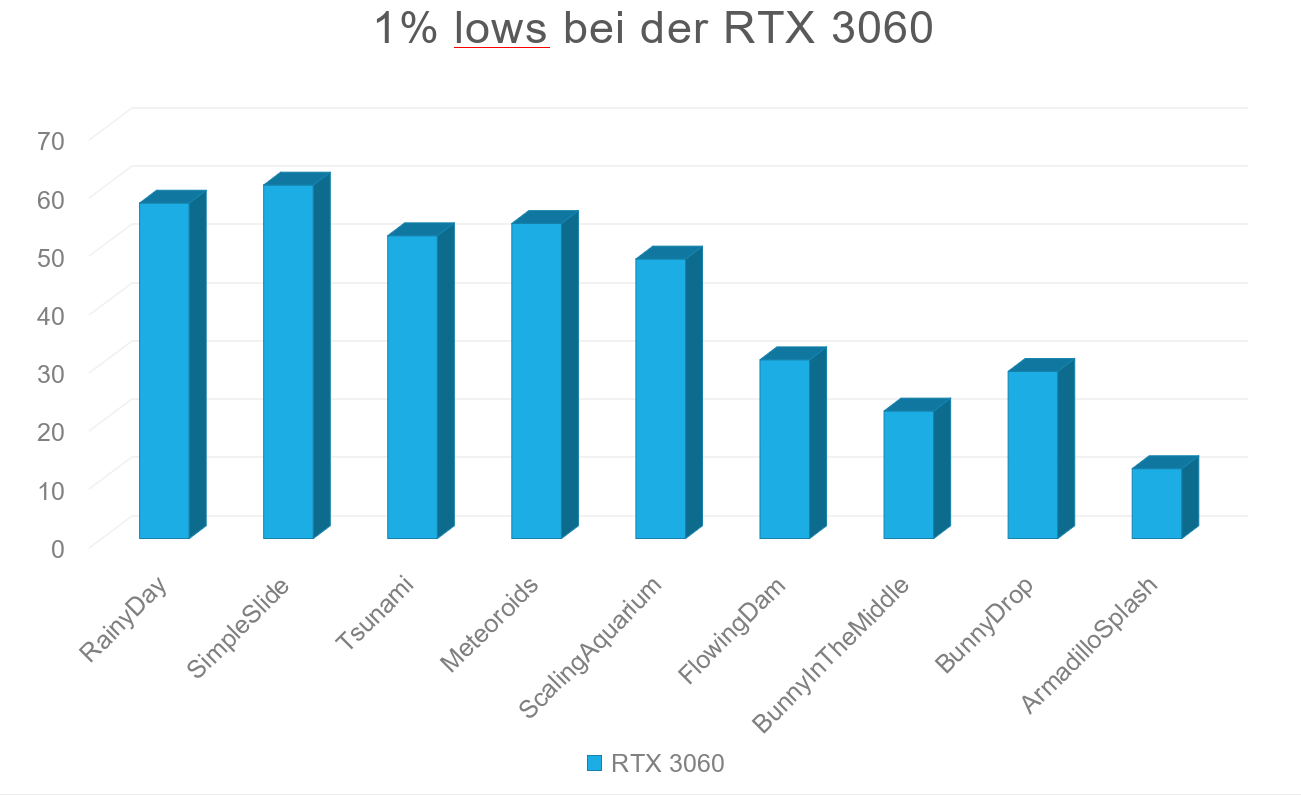
Level of Detail (LOD) is enabled for the results and the tested resolution is full-hd (1920x1080).
All systems passed the test except the system with the RTX 3060.
In the last scene, the RTX 3080 and RTX 4070 Ti could not keep up with real time and ran the simulation at 0.82 and 0.91 of real speed.
Files
Full version of the bachelor's thesis (English only)
Presentation of the thesis defense (German only)
The program: PBFUnity.rar. Use the included Batch files to start the program. Have fun!
Questions? Contact me at mertkaynak2001 at hotmail dot com.
License
This original work is copyright by University of Bremen.
Any software of this work is covered by the European Union Public Licence v1.2.
To view a copy of this license, visit
eur-lex.europa.eu.
The Thesis provided above (as PDF file) is licensed under Attribution-NonCommercial-NoDerivatives 4.0 International


 .
.
Any other assets (3D models, movies, documents, etc.) are covered by the
Creative Commons Attribution-NonCommercial-ShareAlike 4.0 International License.
To view a copy of this license, visit
creativecommons.org.
If you use any of the assets or software to produce a publication,
then you must give credit and put a reference in your publication.
If you would like to use our software in proprietary software,
you can obtain an exception from the above license (aka. dual licensing).
Please contact zach at cs.uni-bremen dot de.